


U.S. Bank Mobile Banking
4.7217.50K Reviews
App Specs
- Version
- 3.80.70
- Updated On
- License
- Free
- Downloads
- 10,000,000+
- Developer
- U.S. Bank Mobile
- Categories
- Finance
- Platform
- Android, iOS
Screenshots
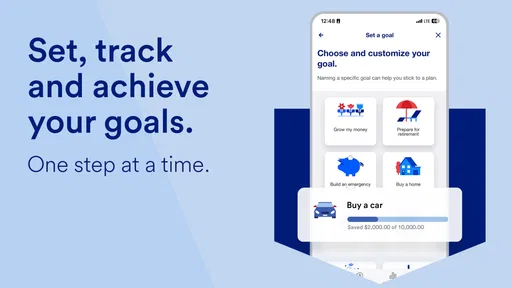
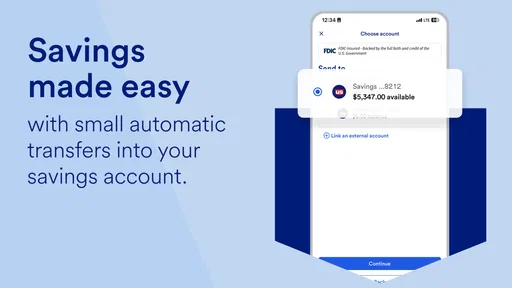
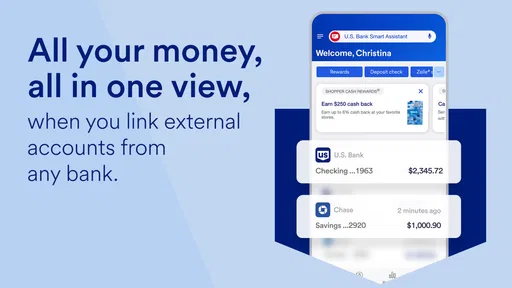
 Analysis by AppCompare
I find it easiest to judge a banking app by the small decisions it helps me make: whether a payment has gone through, whether a card is where I left it, and whether I need to take action before the end of the day. U.S. Bank Mobile Banking is built for those everyday checks. It brings familiar banking tasks onto a phone, which is useful when opening a laptop or visiting a branch would be overkill. The real question is whether you already bank with U.S. Bank, or are considering a change, and whether an app-centered routine suits the way you handle money.
Choose it for your banking routine, not just its feature list
Before switching or downloading, I’d think about where your accounts are and what you want to do from your phone. This is a finance app from U.S. Bank Mobile, so its strongest case is for someone who wants to manage U.S. Bank banking on the go. If you already use the bank, one place for balances, transactions, transfers, bill payments, and card tasks can make routine administration feel less scattered.
It is free, rated for Everyone, and has a 4.7 average from around 504,000 ratings. Those figures suggest that many users find it useful, but they cannot tell you whether its account options or day-to-day workflow are the right fit for you. I’d treat the app as the mobile doorway to a banking relationship, rather than as a stand-alone budgeting tool or a reason by itself to move your money.
Where the app earns a place on my phone
The practical advantage is handling a quick task at the moment it comes to mind. If I’m away from home and want to check a recent transaction, I don’t have to wait until I’m at a computer. If a bill is coming up, I can use the app’s bill-pay tools to plan ahead. And if I misplace a card, the card controls provide a useful first response while I work out whether it is merely tucked into another pocket or actually missing.
Mobile check deposit is especially helpful for someone who occasionally receives a paper check and would rather not make a separate trip just to deposit it. A useful habit is to check the image and details before submitting, then keep track of the check until the deposit appears as expected. That little bit of care matters: taking a picture is convenient, but it does not replace checking that the deposit was completed.
Alerts can also make the app more useful without requiring you to open it constantly. I’d choose notifications for the events I genuinely need to notice, such as account activity I want to review, rather than turning on every possible alert and training myself to ignore them. The payoff is a clearer signal when something deserves attention. This is a modest setup choice, but it can make a banking app feel either calm and helpful or noisy.
Security is a routine, not a one-time setting
The app includes multi-factor authentication and biometric login options, which can make sign-in both more protected and less cumbersome. I’d still use the phone’s own screen lock and avoid checking financial details on a device I do not control. A security feature is most useful when it fits a habit you will actually keep; biometrics can make repeated sign-ins easier, while an extra verification step is a reminder that access to a bank account deserves care.
Worth Reading Before You Choose

Flipboard Shows What News Apps Must Do Beyond the Feed

Switching to Android Auto Means Rethinking Your Driving Routine

Google Calendar Makes a Crowded Week Easier to Manage

Ludo King Makes the Most of the Minutes Between Plans

Baby Panda World Brings Quick Play to Modern Phones, but Its Game Library Feels Busy

ESPN’s Live Game View Makes Following Close Games Easier
Card controls are valuable, but I see them as a way to respond quickly, not a substitute for keeping track of a card or reviewing activity. If a card is misplaced, freezing it while searching is a sensible middle step. If it turns out to be gone, you’ll still need to follow the bank’s process for resolving the situation. Likewise, alerts can help you spot something unexpected, but they do not remove the need to look over transactions from time to time.
How it compares with other ways to bank
Compared with using a bank website in a phone browser, a dedicated app is a more natural place for repeated mobile tasks: checking a balance, moving money, or responding to a card concern. Compared with visiting a branch, it saves a trip for suitable tasks such as checking activity or depositing a check. Neither comparison makes the app a complete replacement for every kind of banking help; some questions are easier to resolve with a person, and some situations call for direct contact with the bank.
It is also different from a budgeting app that brings accounts from multiple institutions together or focuses on spending analysis. This app’s central role is U.S. Bank banking, not a neutral overview of every account you hold elsewhere. If you want one place to examine finances across several banks, a dedicated multi-account tool may fit better. If your priority is to complete everyday banking tasks tied to U.S. Bank, keeping the bank’s own app close at hand is the more direct choice.
What switching would ask of you
If you already have a U.S. Bank account, trying the app is a relatively simple way to see whether mobile banking fits your routine; the app itself is free. If you bank somewhere else, installing it alone will not consolidate your finances. Moving your main banking relationship is a larger decision involving the accounts and payment habits you already rely on. I would compare those practical details first rather than switch because a phone interface looks convenient.
For someone who does change banks, the unglamorous work is often the part that gets missed: reviewing recurring payments, updating the account used for deposits, and making sure important bills still draw from the intended place. I’d make a short list before changing anything and verify each item after the transition. That advice applies to any bank, but it matters here because the app is most useful when the underlying U.S. Bank account is the one you actually use for regular transactions.
Who will get the most from it
I’d recommend it most readily to existing U.S. Bank customers who want to handle everyday account checks and common tasks from a phone. It can also suit someone who receives checks now and then, prefers scheduling bill payments, or likes having card controls and account alerts close by. The app has been available since October 4, 2011, and its current version is 3.78.96, but what matters more to me than version labels is whether the mobile routine matches your needs.
I’d be more cautious if you are choosing a bank mainly for a budgeting dashboard across multiple institutions, or if you rarely use a smartphone for financial tasks. A desktop website may be more comfortable for longer sessions, while a branch or direct support may be preferable when you need personal guidance. And if you are not a U.S. Bank customer, first decide whether the bank itself is a fit; an app cannot make an unsuitable banking relationship right for you.
Your Bank in Your Pocket
Let me start by saying, having your bank accessible from your phone is a game-changer. The U.S. Bank Mobile Banking app brings a full suite of banking services right to your fingertips. Setting it up was a breeze; all I needed was my login details, and I was ready to roll.
Easy Navigation
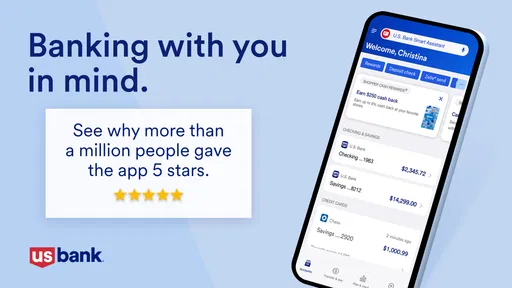
First things first, the app’s interface is super user-friendly. I’m no tech wizard, but navigating through the app felt like a walk in the park. The home screen is clean and intuitive, showcasing my account balances and recent transactions. Need to transfer money? It’s just a couple of taps away.
Features That Pack a Punch
This app isn’t just about checking your balance. It’s loaded with features that make managing your finances a breeze. Here are some highlights:
- Mobile Check Deposit: Forget the bank lines. Snap a picture of your check, and voila, it’s deposited.
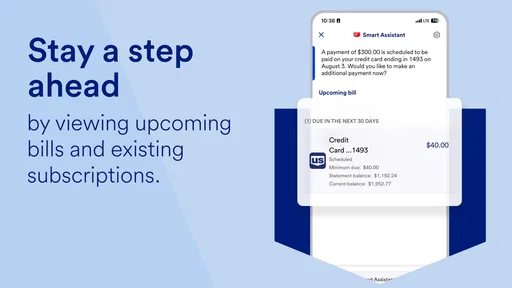
- Bill Pay: Never miss a bill again. Set up payments in advance, and let the app handle the rest.
- Card Controls: Lose your card? Freeze it instantly with the app until you find it.
- Custom Alerts: Stay on top of your finances with notifications that keep you informed.
Security You Can Trust
In today’s digital age, security is king, and the app doesn’t skimp on it. With multi-factor authentication and biometric login options, I felt assured that my financial data was secure. The app even helps you monitor for suspicious activity—talk about peace of mind.
Customer Service at Your Fingertips
Got a question or an issue? The app’s customer service is just a click away. I tested it out myself and was pleasantly surprised by the quick and helpful responses. Whether it’s a chat or a call, help is always at hand.
A Few Thoughts to Wrap Up
Overall, the U.S. Bank Mobile Banking app does a stellar job of bringing the bank to you, wherever you are. It’s not just about convenience; it’s about empowerment. Managing my finances has never felt easier, and I find myself relying on the app more and more each day.
So, if you’re on the lookout for a banking app that’s reliable, secure, and packed with features, give this one a shot. You might just find it’s the financial partner you’ve been searching for.
My recommendation
My clearest recommendation is to judge this app as part of U.S. Bank’s service, not as a stand-alone reason to choose a bank. Its audience is broad: the app has more than 10 million installs, but popularity alone does not establish that it will suit every customer. I’d start by deciding whether you want your everyday banking tied to U.S. Bank, then consider whether app-based access is a comfortable way for you to manage it.
For a typical day, imagine getting a paper check while you are away from home, needing to confirm a recent purchase, and remembering that a household bill is due soon. The app can bring those separate errands into one mobile routine: review the transaction, deposit the check, and arrange the payment. I would still verify that each action completed and keep an eye on the account afterward. Convenience is strongest when it reduces unnecessary trips without encouraging you to stop checking the details.
There is a small but meaningful trade-off in keeping banking on your phone. Quick access makes it easier to act promptly, but it also means alerts and sign-in habits deserve thought. I’d enable only notifications that help me make a decision, protect the device with its own lock, and use the app when I have a private moment rather than casually exposing account details in a public setting. Those are simple practices, not extra features, and they make mobile access more sensible.
One question many people have is whether the app can replace every interaction with a bank. I would not count on any mobile app to do that. It is well suited to routine self-service, while complicated account questions or situations requiring a person may be better handled through direct customer support. Another practical question is whether it is useful without an existing U.S. Bank relationship: it is most compelling when you bank there, because its purpose is to manage those accounts rather than provide a general financial hub.
Overall, I’d choose it if I were a U.S. Bank customer who wanted a convenient way to check activity and handle common tasks, and I’d keep the bank’s website or personal support in mind for work that is easier on a larger screen or with a person. I would skip it as my primary finance app if my main need were a cross-bank budget view or if I preferred not to manage money by phone. For the right customer, it is a practical companion to the account; for everyone else, the better first decision is choosing the banking relationship that fits.
Pros
- User-friendly interface
- easy navigation.
- Secure login with biometric authentication.
- Real-time transaction alerts.
- Comprehensive financial management tools.
- Quick access to customer support.
Cons
- Limited features for non-U.S. residents.
- Occasional app crashes reported.
- Some features require internet connection.
- Account setup is time-consuming.
- Limited customization options.
FAQs for U.S. Bank Mobile Banking
What features does the U.S. Bank Mobile Banking app offer?
The U.S. Bank Mobile Banking app provides a wide range of features including account management, bill payments, mobile check deposits, and access to Zelle for quick money transfers. Users can also view transaction history, locate ATMs, and receive account alerts. The app ensures secure access with biometric login and customizable security settings.
Is the U.S. Bank Mobile Banking app secure?
Yes, the U.S. Bank Mobile Banking app employs advanced security measures to protect user information. It includes biometric authentication options like fingerprint and face recognition, encryption of sensitive data, and multi-factor authentication. Users are also encouraged to set up alerts for suspicious activities to enhance security further.
Can I deposit checks using the U.S. Bank Mobile Banking app?
Absolutely, the app allows users to deposit checks conveniently through its mobile check deposit feature. Simply take a photo of the front and back of your check with your smartphone and follow the instructions within the app. Ensure you have a stable internet connection and meet the app’s deposit requirements for a smooth experience.
Does the U.S. Bank Mobile Banking app support multiple accounts?
Yes, the app supports multiple accounts, allowing users to manage personal and business accounts from one platform. You can easily switch between accounts, view balances, and track transactions. This feature is designed to streamline financial management and provide a comprehensive overview of your banking activities.
What should I do if I encounter issues with the app?
If you experience any issues with the U.S. Bank Mobile Banking app, you can contact U.S. Bank’s customer support via phone or live chat within the app. Additionally, the app offers a help section with FAQs and troubleshooting tips. Ensure your app is updated to the latest version to avoid common problems.


